
Eisenhower Matrix For Time Management

Your to-do list has become a tiny paperwork dragon. It breathes fire, hoards unfinished tasks, and somehow convinces you that “reply to one Slack message” and “finish the project that pays rent” deserve equal emotional panic. Rude.
That is where the eisenhower matrix for time management comes in. It is a simple prioritization system that helps you sort tasks by two brutally useful questions: Is it urgent? Is it important? Once you answer those, your day stops looking like a chaotic buffet of obligations and starts looking like a battle plan. Crown polished. Gloves on. Distractions beware.
The Eisenhower Matrix is especially helpful if you constantly feel busy but not productive, if your calendar is stuffed with other people’s emergencies, or if you keep “accidentally” spending 42 minutes on YouTube because your brain insisted it was “research.” Sure, buddy. The algorithm knighted you.
In this guide, we’ll break down exactly how to use the Eisenhower matrix for time management, how to decide what goes in each quadrant, how to combine it with scheduling and website blocking, and how tools like BlockChamp can help you defend the throne once you know what actually deserves your attention.
Quick Answers
What Is the Eisenhower Matrix? The Tiny Grid With Big “Get Your Life Together” Energy
The Eisenhower Matrix, also called the urgent-important matrix, is a four-quadrant decision tool for prioritizing work. It is often associated with Dwight D. Eisenhower, the 34th U.S. President and former Supreme Commander of Allied Forces in Europe during World War II. The idea is commonly summarized by the quote: “What is important is seldom urgent and what is urgent is seldom important.” Productivity nerds love this quote. Calendars fear it.
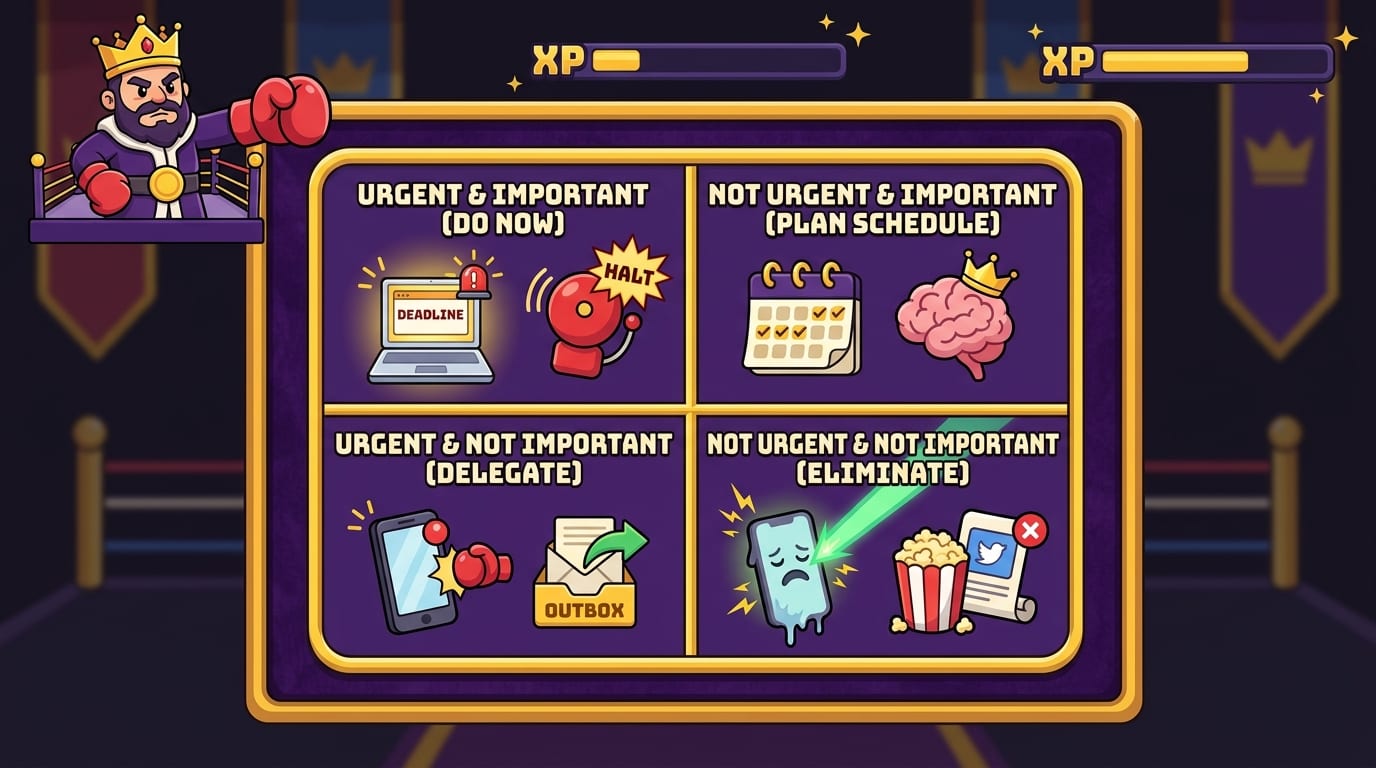
The matrix separates tasks into four categories:
- Urgent and important: Do these tasks now.
- Important but not urgent: Schedule these tasks.
- Urgent but not important: Delegate, reduce, or contain these tasks.
- Not urgent and not important: Delete, avoid, or block these tasks.
The magic is not that the grid is complicated. It is the opposite. The magic is that it forces a decision. Instead of treating every task like it is wearing a little emergency hat, you judge it based on actual value and timing.
This matters because attention is expensive. According to the American Psychological Association’s research on multitasking, switching between tasks can reduce efficiency because your brain has to repeatedly reorient itself. Translation: every time you bounce from spreadsheet to notification to inbox to “just checking Reddit,” your brain pays a toll. The toll collector is wearing clown shoes.
The Eisenhower Matrix helps you reduce those attention tolls by clarifying what deserves focus, what needs boundaries, and what should be yeeted into the productivity dungeon.
Why the Eisenhower Matrix Works for Time Management
The phrase “time management” is a little misleading. You cannot manage time. Time continues marching forward like a smug medieval drummer. What you can manage is attention, priority, energy, and your environment. The Eisenhower matrix for time management works because it makes those choices visible.
Most people do not have a productivity problem because they are lazy. They have a prioritization problem. They respond to whatever shouts the loudest: inbox pings, app badges, texts, meeting invites, breaking news, random “quick questions,” and the cursed browser tab that says “Top 10 Celebrity Kitchen Renovations.” That last one is how empires fall.
The Eisenhower Matrix interrupts reactive work. It asks:
- Does this move an important goal forward?
- Does this have a real deadline or consequence?
- Am I doing this because it matters, or because it feels easier than the scary important thing?
- Can someone else handle this?
- Should this task exist at all?
This is important for both knowledge workers and students. A student might confuse “organize notes beautifully” with “study the material that will be on the exam.” A freelancer might confuse “redesign portfolio colors again” with “send proposals.” A remote worker might confuse “available all day on Slack” with “productive.” The matrix points at the truth and says, “Nice costume, fake productivity. Back in the box.”
If you want more general systems for protecting your schedule, BlockChamp has a useful guide on work time management tips that pairs nicely with the matrix. Think of that post as the royal training montage; this one is the battle map.
The Four Quadrants Explained Without Corporate Fog Machine Nonsense
Let’s make the four quadrants practical. No vague productivity mist. No “synergize your priorities.” We are not summoning a boardroom ghost.
Quadrant 1: Urgent and Important — Do It Now
These tasks matter and need immediate action. They have consequences if ignored. Examples include:
- A client deadline due today
- A broken checkout page on your business website
- A final exam tomorrow
- An overdue bill that triggers a fee
- A manager asking for a critical document before a meeting
Quadrant 1 is crisis territory. Some of it is unavoidable. Life occasionally throws flaming chickens into the throne room. But if you live here all day, every day, something is broken upstream. You may be procrastinating on Quadrant 2 work, overcommitting, skipping planning, or letting distractions eat the time that should have prevented the emergency.
Quadrant 2: Important but Not Urgent — Schedule It Like a Royal Decree
This is the most valuable quadrant. It includes work that creates long-term progress but does not scream for attention. Examples include:
- Planning your week
- Studying before exam week
- Writing, coding, designing, researching, or deep work
- Exercise and health habits
- Skill development
- Building systems that prevent future chaos
Quadrant 2 is where your future self sends thank-you notes. It is also the quadrant most likely to get sacrificed when distractions invade. Why? Because important work often feels uncomfortable. It requires focus, uncertainty, and sometimes the emotional courage to produce a first draft that looks like it was assembled by raccoons.
This is where combining the Eisenhower Matrix with tools like BlockChamp becomes powerful. Once you identify your important-but-not-urgent work, you can schedule a focus block and turn on website blocking for the usual suspects: social media, video, news, shopping, gaming, or AI distractions. BlockChamp’s Master Focus Toggle puts The King on guard, and if you try to sneak into a blocked site, The Stare-Down reminds you that your 12-day reign is not worth losing over “just one meme.” Harsh? Maybe. Effective? Deliciously.
Quadrant 3: Urgent but Not Important — Delegate or Contain It
These tasks feel urgent, but they do not meaningfully advance your goals. They often come from other people’s priorities. Examples include:
- Most “quick question” interruptions
- Low-value meetings
- Non-critical emails that demand fast replies
- Administrative requests someone else could handle
- Notifications that are technically timely but strategically useless
Quadrant 3 is sneaky because it wears the costume of responsibility. You feel productive responding quickly. You feel helpful. You feel like a noble workplace knight. But if your whole day becomes urgent-not-important work, your own meaningful work gets shoved into midnight, where it sits next to bad snacks and regret.
Delegating is ideal when possible. If not, batch these tasks. Check messages at set times. Create templates. Use office hours. Put boundaries around availability. You are allowed to be helpful without becoming the kingdom’s human notification bell.
Quadrant 4: Not Urgent and Not Important — Delete It, Block It, Banish It
This is the realm of low-value distraction. Examples include:
- Doomscrolling
- Random YouTube rabbit holes
- Refreshing analytics every six minutes
- Browsing shopping sites with no intention to buy anything useful
- Reading comment wars between strangers named “TruthDragon_92” and “LasagnaInvestor”
Quadrant 4 is not the same as rest. Rest is important. Taking a walk, calling a friend, playing a game intentionally, or watching a show after work can be valuable. Quadrant 4 is the stuff you do by default, not by choice. It leaves you feeling weirdly tired and spiritually covered in browser crumbs.
This quadrant is a perfect place for a website blocker. BlockChamp lets you block specific sites, keywords, or entire categories. Free users can block up to three sites and two categories, while Champion users can block unlimited sites and all eight distraction categories. If Quadrant 4 keeps mugging your attention in an alley, do not negotiate with it. Put The King at the gate.

How to Use the Eisenhower Matrix for Time Management Step by Step
Let’s turn theory into a practical workflow. You can do this on paper, in a notes app, in a spreadsheet, on a whiteboard, or on the back of an envelope if you enjoy productivity with a suspicious coffee stain aesthetic.
Step 1: Brain Dump Every Task
Start by listing everything that is occupying mental space. Do not sort yet. Just dump it. Work tasks, personal errands, assignments, emails to send, bills to pay, projects, reminders, “buy toothpaste,” all of it. Your brain is not a filing cabinet. It is more like a raccoon with Wi-Fi. Get the tasks out.
A brain dump might include:
- Finish client proposal
- Reply to five emails
- Study chapters 4-6
- Book dentist appointment
- Update resume
- Watch tutorial on new software
- Check Instagram messages
- Pay electricity bill
- Plan next week’s content calendar
Step 2: Mark Importance First
Importance is about value. Ask: Does this task contribute to a meaningful goal, responsibility, relationship, health outcome, or consequence? If yes, it is important. If it merely creates motion, noise, or the illusion of usefulness, it may not be.
Be honest. “Check Instagram messages” may be important if you run a creator business and customer inquiries arrive there. It may be unimportant if you are checking whether your friend’s cousin posted another gym mirror selfie. Context matters. The matrix is not a moral judgment. It is a priority filter.
Step 3: Mark Urgency Second
Urgency is about time pressure. Is there a deadline? Is there a real cost to delay? Does someone need this soon to move forward? Urgent tasks are time-sensitive, but not all time-sensitive tasks are equally valuable.
This order matters: importance first, urgency second. If you start with urgency, your inbox will crown itself king and start taxing the peasants.
Step 4: Place Tasks Into the Four Quadrants
Now sort each task:
- Do: Important and urgent tasks go into today’s action list.
- Schedule: Important but not urgent tasks get calendar time.
- Delegate or batch: Urgent but not important tasks get assigned, limited, or handled in batches.
- Delete or block: Not urgent and not important tasks get removed, ignored, or blocked.
If you want a broader daily productivity structure to combine with this, read BlockChamp’s guide on how to make time with a daily productivity system. The matrix tells you what matters; a daily system helps you actually execute without becoming a chaos goblin in a hoodie.
Step 5: Convert the Matrix Into Your Calendar
The biggest mistake people make is stopping at categorization. A beautiful matrix without calendar action is just productivity fan art.
For Quadrant 1, choose your top tasks for immediate action. For Quadrant 2, create time blocks. For Quadrant 3, set specific windows for communication and admin. For Quadrant 4, remove temptation from the environment.
Example schedule:
- 9:00–10:30: Client proposal deep work
- 10:30–10:45: Email batch
- 10:45–12:00: Continue proposal
- 1:00–2:00: Study chapters 4-6
- 2:00–2:20: Admin tasks
- 3:00–3:30: Plan content calendar
Then activate your focus environment. Close extra tabs. Silence notifications. Turn on BlockChamp. The King does not care that YouTube has “one helpful video.” He has seen this scam before.
Examples: Eisenhower Matrix for Students, Remote Workers, and Freelancers
The Eisenhower matrix for time management becomes easier when you see it in real scenarios. Let’s sort three common attention battlegrounds.
Student Example: Exam Week Without the Academic Meltdown
A student’s list might include studying, joining group chat chaos, submitting assignments, watching lectures, checking grades, and reorganizing notes for the 700th time.
- Do: Submit assignment due tonight; review material for tomorrow’s exam.
- Schedule: Study sessions for next week’s exams; create practice questions; sleep like a functioning mammal.
- Delegate or batch: Group project messages; club admin; non-urgent professor emails.
- Delete or block: TikTok scrolling, random YouTube drama, refreshing grade portal every eight minutes.
BlockChamp fits nicely here because students often know what to do but get ambushed by digital distractions. Blocking Video & Streaming or Social Media during study blocks can turn “I’ll start after one clip” into “Nice try. The King sees you.” You still get breaks. You just take them intentionally instead of being kidnapped by an app wearing a dance challenge costume.
Remote Worker Example: Slack Is Not a Strategy
Remote workers often fight blurred boundaries. Your home is your office, your office is your kitchen, and your kitchen contains snacks that whisper. Add Slack, email, meetings, and browser distractions, and deep work gets body-slammed.
- Do: Fix urgent customer issue; prepare deck for today’s leadership call.
- Schedule: Write documentation; improve workflow; complete certification; plan quarterly goals.
- Delegate or batch: Routine status updates; low-priority meeting requests; non-urgent chat messages.
- Delete or block: News checking, social feeds, shopping tabs, random “productivity tool research” that is secretly procrastination in a fake mustache.
If remote work is your daily arena, pair this approach with six tools to tackle time management and procrastination. The right tools do not replace discipline, but they do stop discipline from having to fight a dragon every 12 minutes.
Freelancer Example: The Boss Is You, Unfortunately
Freelancers face a unique problem: nobody is coming to rescue the schedule. You are sales, delivery, finance, support, marketing, and occasionally janitor of your own Google Drive.
- Do: Send invoice due today; finish client deliverable; respond to high-value lead.
- Schedule: Build portfolio; create outreach system; improve service package; learn a profitable skill.
- Delegate or batch: Bookkeeping, email sorting, scheduling calls, file organization.
- Delete or block: Endless competitor research, social media comparison spirals, checking analytics without acting.
The matrix helps freelancers protect revenue-generating and reputation-building work. BlockChamp helps protect the actual minutes. That combo is the productivity equivalent of wearing armor and also not walking into traffic.
Common Mistakes That Make the Matrix Flop Like a Sad Pancake
The Eisenhower Matrix is simple, but humans are wonderfully talented at complicating simple things. Here are the usual mistakes.
Mistake 1: Calling Everything Important
If everything is important, nothing is. Importance should be tied to goals, consequences, values, or commitments. “I should maybe read this article someday” is not the same as “I need to submit my tax documents before the deadline.” One is a mild idea. The other is the government tapping its foot.
Mistake 2: Letting Urgency Bully Importance
Urgent tasks feel powerful because they create adrenaline. Important tasks often feel quiet. But quiet does not mean optional. Exercise is quiet until your body starts filing complaints. Studying is quiet until the exam arrives with a tiny evil trumpet. Relationship maintenance is quiet until neglect becomes a problem.
Research from Harvard Business Review on focusing on important work instead of only urgent work explains how people often prioritize time-sensitive tasks even when less urgent tasks are more valuable. In other words, we chase the blinking light. The matrix helps you stop worshipping the blinking light.
Mistake 3: Not Scheduling Quadrant 2
Quadrant 2 is where the gold lives, but it does not happen by vibes. You need calendar blocks. “Work on book sometime” is a wish. “Write 800 words from 8:30 to 10:00 on Tuesday with social media blocked” is a plan. The second one has a crown.
Mistake 4: Using the Matrix Once and Then Ghosting It
The matrix works best as a habit. Use it weekly for planning and daily for quick triage. It does not need to take long. Five minutes in the morning can save hours of fake productivity jousting.
Mistake 5: Ignoring Your Environment
You can label Instagram as Quadrant 4 all day, but if the tab is open, notifications are on, and your willpower is running on two hours of sleep and vending machine coffee, good luck, champ. Environment beats intention more often than we like to admit.
That is why blocking distractions is not “cheating.” It is designing the battlefield. BlockChamp’s focus schedules, category blocking, and Hardcore Lockdown mode help you make your chosen priorities harder to abandon impulsively. In Hardcore Lockdown, Champion users can require a cooldown timer or a three-round boxing riddle before turning focus off. If you are going to surrender the throne, at least make your procrastination win a mini boss fight.
Pairing the Eisenhower Matrix With Time Blocking
The Eisenhower Matrix tells you what to prioritize. Time blocking tells you when it will happen. Together, they are the buddy-cop duo your calendar deserves.
Time blocking means assigning specific blocks of time to specific types of work. Instead of carrying a giant to-do list all day and hoping motivation descends from the heavens like a caffeinated angel, you decide in advance what each chunk of the day is for.
Here is a simple pairing:
- Quadrant 1: Put urgent-important tasks at the beginning of the day or before the deadline.
- Quadrant 2: Reserve your highest-energy hours for deep work, planning, learning, and prevention.
- Quadrant 3: Batch communication into 1–3 windows instead of letting it leak everywhere.
- Quadrant 4: Schedule real breaks, but block accidental distraction during work blocks.
There is solid reasoning behind this. According to Atlassian’s discussion of context switching, constantly moving between tasks can create significant productivity costs. Time blocking reduces those switches by giving your brain one mission at a time. One mission. One throne. Fewer tabs breeding in the corner.
If you want to connect this to financial thinking, BlockChamp’s post on how to save your time like your money is a great companion. The short version: stop spending prime focus hours on penny tasks. Your attention budget deserves better accounting.
How BlockChamp Makes the Matrix Stick When Willpower Gets Wobbly
Let’s be honest: many productivity systems fail at the exact moment temptation appears. You make the plan. You believe in the plan. You admire the plan. Then a notification appears and suddenly you are watching a man restore a rusty meat grinder at 1.25x speed. The plan did not stand a chance.
BlockChamp helps bridge the gap between intention and behavior. Once your Eisenhower Matrix identifies what belongs in Quadrant 4, BlockChamp helps you keep it out of your work session. It is a gamified website blocker for Chrome that turns focus into a game instead of a grim punishment ritual.
Useful ways to combine BlockChamp with the Eisenhower Matrix:
- Block Quadrant 4 sites: Add your top distraction sites, like YouTube, Reddit, TikTok, Instagram, news sites, shopping sites, or gaming pages.
- Use category blocking: Instead of playing whack-a-mole with individual websites, block entire categories such as Social Media, Video & Streaming, News, Shopping, Gaming, Gambling, Adult, or AI Distractions.
- Schedule focus blocks: Champion users can set recurring schedules so The King stands guard during work or study hours automatically.
- Make surrender harder: Hardcore Lockdown adds a cooldown timer or boxing riddle before you can turn focus off, giving impulses time to fade.
- Reward consistency: Earn XP, levels, badges, streaks, and leaderboard progress for staying focused. Productivity, but with confetti. As nature intended.
The Stare-Down block page is especially useful because it turns a slip into a pattern interrupt. Instead of silently opening the distraction, you get The King staring at you like you tried to smuggle nachos into the royal library. It is funny, but it also creates just enough friction to help you choose your scheduled priority again.
That matters because habit change often depends on making good behaviors easier and bad behaviors harder. James Clear’s work on behavior design in Atomic Habits popularized this principle: environment design is a powerful lever. You do not need heroic willpower if your environment is already built to support the choice you wanted to make.
A Simple Daily Eisenhower Matrix Routine
You do not need a 17-tab productivity dashboard with dragon-themed labels. A lightweight routine is enough. Here is a daily version you can run in 10 minutes or less.
- Brain dump: Write down everything you think you need to do today.
- Pick true deadlines: Circle anything with a real consequence today or tomorrow.
- Mark meaningful tasks: Star anything that moves an important goal forward.
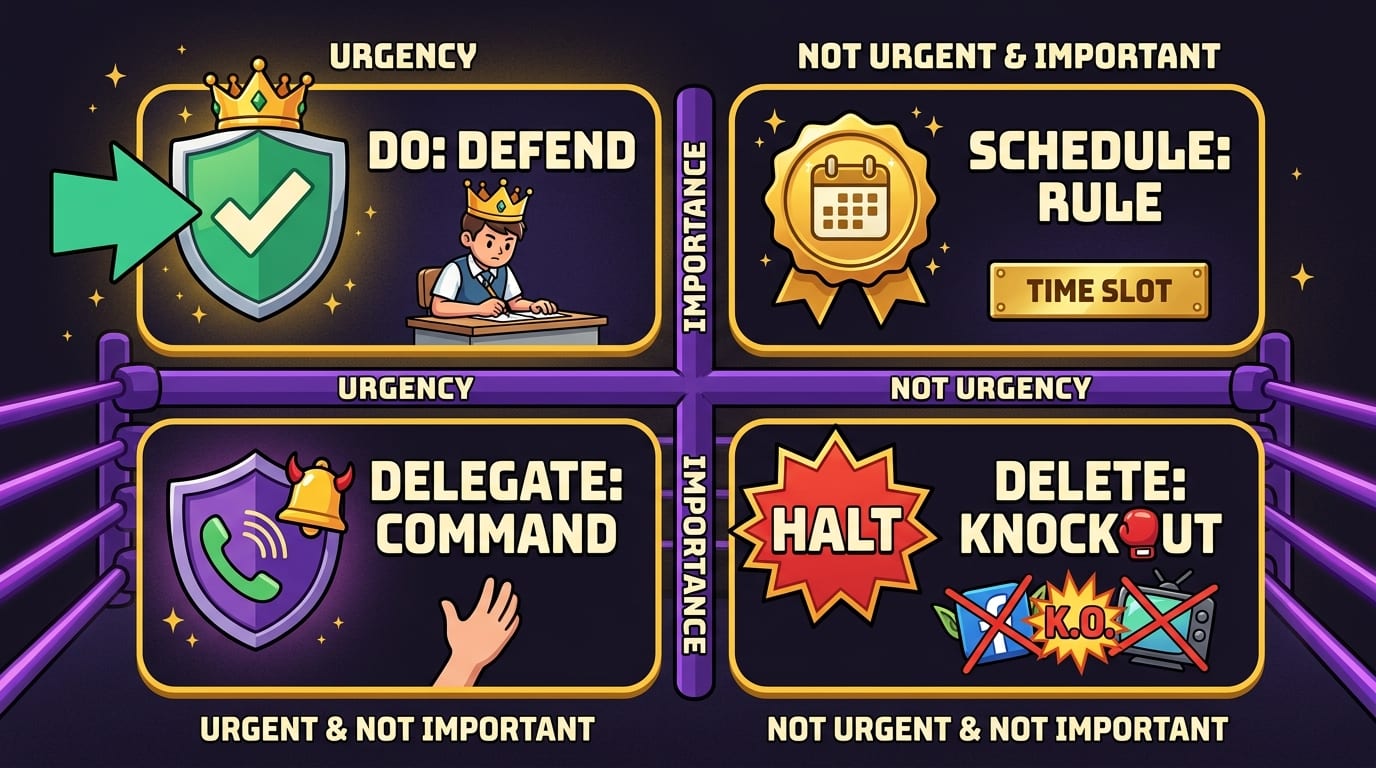
- Sort into quadrants: Do, schedule, delegate/batch, delete/block.
- Choose your top 1–3: Do not crown 12 tasks as “top priority.” That is just a mob wearing crowns.
- Time block them: Put important work directly on your calendar.
- Defend the block: Turn on BlockChamp, silence notifications, and close unrelated tabs.
- Review at day’s end: What got done? What moved? What keeps pretending to be urgent?
For bonus points, do a weekly version every Sunday or Monday. Weekly planning helps you catch Quadrant 2 tasks before they mutate into Quadrant 1 emergencies with fangs.
You can also measure whether your system is working. A time tracker can show where your hours actually go, not where your optimistic little brain claims they go. BlockChamp has a helpful post on how using a time tracker can increase your productivity. Pair tracking with the matrix and you get a clearer picture of which quadrants are stealing your week.
Quick Eisenhower Matrix Template You Can Steal Like a Productivity Bandit
Use this simple template whenever your tasks feel messy:
Quadrant 1: Do Now
- What must be handled today?
- What has a real deadline or consequence?
- What important commitment is at risk if ignored?
Quadrant 2: Schedule
- What would make next week easier?
- What goal needs focused progress?
- What health, learning, planning, or relationship task matters but is easy to postpone?
Quadrant 3: Delegate, Batch, or Limit
- What feels urgent mostly because someone else wants it fast?
- What can be answered during a communication window?
- What can be automated, templated, delegated, or politely declined?
Quadrant 4: Delete or Block
- What drains time without real recovery or value?
- Which sites or apps trigger accidental scrolling?
- What should be removed from your work environment entirely?
When in doubt, ask: “If I do this task, what gets better?” If the answer is “my anxiety temporarily shuts up,” that may not be enough. Anxiety loves fake tasks. It will happily make you color-code folders while the important project sits in the corner wearing a disappointed crown.

Final Thoughts: Prioritize Like a President, Focus Like a Champ
The Eisenhower matrix for time management is powerful because it cuts through the fog. It helps you stop asking “What should I do next?” every five minutes and start making cleaner decisions: do it, schedule it, delegate it, or delete it.
But the matrix is only half the battle. Priorities need protection. Your important work will not politely defend itself from notifications, social feeds, video rabbit holes, shopping tabs, news spirals, and the algorithmic circus cannon aimed directly at your attention span.
So build the system. Sort your tasks. Schedule your Quadrant 2 work. Batch the noisy stuff. Delete what does not matter. And when Quadrant 4 tries to sneak back into the castle wearing sunglasses and a fake mustache, let BlockChamp’s King handle the door.
If you are ready to turn your priorities into actual focused time, try BlockChamp for Chrome. Block distracting sites, earn XP, build your reign, survive The Stare-Down, and become king of your time. Long live your focus, champ. 👑🥊
Related posts

Finding Focus For Fiction Writing

Learning To Focus In A Digital World As A Creative

Finding Focus For Personal Growth
