
How Using A Time Tracker Can Increase Your Productivity

You do not need another productivity hack that smells like a spreadsheet wearing a tiny tie. You need visibility. That is the boring-but-powerful secret behind how using a time tracker can increase your productivity: it turns your workday from “I was busy, probably?” into actual evidence. Minutes become data. Distractions become suspects. Your schedule stops being a foggy swamp and starts looking like a map with little red flags that say, “Here be YouTube dragons.”
A time tracker is not magic. It will not write your essay, finish your client proposal, or stop you from checking Reddit “for research” unless your research topic is raccoons stealing cat food. But it can show you where your time goes, which tasks eat your energy, and which habits are quietly mugging your focus in an alley. Pair that with a distraction blocker like BlockChamp, and suddenly you are not just measuring time—you are defending it with a royal boxer who roasts your bad decisions. Healthy? Maybe. Effective? Very.
In this guide, we will break down practical steps for using a time tracker to increase productivity, reduce distractions, improve planning, and build a workday that does not collapse the moment a notification blinks at you like a cursed lighthouse.
Quick Answers
What a Time Tracker Actually Does, Besides Judging Your Calendar
A time tracker records how long you spend on tasks, projects, websites, apps, or categories of work. Depending on the tool, it may work manually, automatically, or somewhere in between. Manual tracking means you start and stop a timer when you switch tasks. Automatic tracking watches activity in the background and creates reports. Hybrid systems let you track focused sessions, label tasks, and review patterns later.
The value is not the timer itself. The value is the mirror. Most people are hilariously bad at estimating time. You think email took 20 minutes. It took 57. You think you spent “a little while” on social media. Congratulations, baron of denial, it was 92 minutes and three emotional support reels. Time tracking brings receipts.
This matters because productivity is not only about doing more. It is about doing the right things with less waste. A time tracker helps you answer questions like:
- Which tasks take longer than expected?
- When during the day do you do your best focused work?
- How much time gets eaten by meetings, admin, or messaging?
- Which websites or apps interrupt your work most often?
- Are you spending enough time on high-value work, or just polishing the royal doorknobs?
That last one is important. Many people are busy all day but not productive. Busy is answering every Slack message instantly. Productive is finishing the thing that actually matters. A tracker helps separate “motion” from “progress,” which is basically productivity’s version of separating gold coins from pocket lint.
Why Measuring Time Makes You Better at Using It
There is a management quote often attributed to Peter Drucker: “What gets measured gets managed.” Even if productivity nerds have beaten that line into paste, it remains true. When you measure your time, you start noticing patterns. Once you notice patterns, you can change them. Without measurement, you are just vibes in a trench coat.
Research backs up the idea that self-monitoring can influence behavior. A review published in the Journal of Medical Internet Research found that digital self-monitoring tools can help people change habits by increasing awareness and feedback. Time tracking works similarly: it creates a feedback loop. You act, record, review, adjust, repeat. Congratulations, you have invented personal analytics without needing a dashboard that looks like NASA spilled coffee.
Time tracking also improves estimation. This is massive. Bad estimates create chaotic days. You schedule a task for 30 minutes, it takes two hours, and suddenly your afternoon has been thrown into a moat. By tracking actual task durations, you build a personal database of how long things really take. That makes planning less fictional.
For example, you may discover:
- Writing a blog post outline takes 35 minutes, not 10.
- Client revisions usually take 90 minutes, not “quickly after lunch.”
- Your “morning admin” block is secretly a two-headed beast made of email and panic.
- You do deep work best from 9:30 to 11:30 a.m., before your brain turns into soup with notifications.
Once you know this, your schedule becomes realistic. Realistic schedules reduce stress because you stop trying to fit a castle into a lunchbox. You also become better at saying no, setting deadlines, and protecting focus blocks.
The Productivity Benefits of Time Tracking: The Royal Receipt List
Let us get specific. If you are wondering how using a time tracker can increase your productivity in the real world, here are the main ways it helps.
1. It reveals your hidden time leaks
Time leaks are small moments that feel harmless but add up like goblins with calculators. Five minutes checking X/Twitter. Seven minutes on YouTube. Three minutes refreshing email. Repeat 20 times. Suddenly you have donated an entire afternoon to the Attention Goblin Foundation.
According to the RescueTime blog, modern workers often switch between communication tools and tasks frequently, and those switches fragment attention. Even if each interruption is short, the recovery cost can be brutal. A time tracker helps you see not just big distractions, but tiny attention taxes.
2. It makes priorities painfully obvious
When you review your tracked time, you may find that your top priority got 47 minutes while low-value admin got three hours. That is not a productivity system. That is a coup. Your inbox has overthrown the crown.
Tracking gives you the data to rebalance. You can move important work earlier, reduce unnecessary meetings, batch admin, or set stricter boundaries around shallow tasks.
3. It reduces procrastination by adding friction
Starting a timer is a tiny commitment. When you press “start” on “Write report,” your brain gets a signal: we are doing this now. It is not foolproof, because the brain is a slippery raccoon, but it helps. The timer creates accountability and a clearer beginning.
4. It helps you match work to energy
Not all hours are equal. One focused morning hour can be worth three foggy late-afternoon hours where you stare at a sentence like it personally insulted your family. Time tracking lets you identify your natural energy peaks and schedule demanding tasks when your brain has its crown on straight.
5. It supports better breaks
Tracking does not mean working nonstop like a caffeine-powered printer. In fact, it can help you take smarter breaks. You can see when your focus drops, how long sessions should be, and whether breaks refresh you or become accidental Netflix sabbaticals.

Step 1: Track Your Time for One Week Without Trying to Be Impressive
The first rule of time tracking is: do not perform for the tracker. People often start tracking and instantly become Productivity Royalty for two days. They label everything, avoid distractions, drink water, and act like their calendar is being inspected by a stern owl. Then the novelty fades, and the truth returns wearing sweatpants.
For the first week, your job is not to optimize. Your job is to observe. Track your normal behavior as honestly as possible. This gives you a baseline. Without a baseline, improvement is just guessing with better stationery.
Use simple categories at first:
- Deep work: writing, coding, studying, designing, planning
- Communication: email, Slack, messages, calls
- Meetings: scheduled conversations, standups, reviews
- Admin: invoices, scheduling, file cleanup, forms
- Learning: courses, research, reading
- Breaks: meals, walks, rest
- Distractions: social media, random browsing, video rabbit holes
Do not create 97 categories unless you enjoy turning your life into a tax form. Keep it simple enough that you will actually use it.
At the end of the week, review the numbers. Ask:
- What surprised me?
- Which tasks took longer than expected?
- Where did distractions appear most often?
- Which time of day produced the most meaningful work?
- What should I protect next week?
This is where your productivity starts improving. Not because the tracker did anything magical, but because you finally stopped letting your schedule be run by ghosts, vibes, and push notifications.
Step 2: Turn Time Data Into Better Daily Planning
Once you have a baseline, use your time tracking data to build a better plan. The goal is not to pack every minute. The goal is to give your best work the best hours and stop pretending you can do twelve major tasks before lunch. You are ambitious, champ, not a wizard with a printer jam.
Start by identifying your top three task types:
- High-value work: the tasks that move projects, grades, revenue, or goals forward.
- Maintenance work: necessary tasks like email, admin, updates, and coordination.
- Recovery: breaks, meals, exercise, and actual human maintenance. Yes, you are allowed to be a mammal.
Now compare your tracked week against your desired week. If your high-value work gets squeezed into leftovers, that is the problem. Schedule deep work first. Put it on your calendar like a meeting with someone terrifyingly important. Because it is. It is a meeting with Future You, and Future You is tired of your nonsense.
Use time estimates from your tracker to plan realistically. If editing videos usually takes three hours, do not schedule it into a 45-minute gap between calls. That is not optimism. That is calendar fan fiction.
A simple daily planning formula:
- Pick one main outcome for the day.
- Schedule one to three focused work blocks for that outcome.
- Batch messages and admin into specific windows.
- Leave buffer time for overruns, because life enjoys throwing pies.
- Review tracked time at the end of the day and adjust tomorrow.
This turns time tracking into a planning engine. You stop reacting. You start reigning.
Step 3: Use Time Tracking to Catch Distractions Red-Handed
Here is the awkward truth: most productivity problems are not caused by laziness. They are caused by environments designed to hijack attention. Social media feeds, video platforms, news sites, shopping apps, and algorithmic everything are built to keep you clicking. If you feel like you cannot stop, you are not uniquely broken. You are wrestling a casino wearing a friendly app icon.
The American Psychological Association notes that task switching can reduce efficiency because the brain needs time to reorient. So every time you bounce from work to a notification and back, you are paying a switching cost. Tiny cost, huge pile.
A time tracker reveals the pile. It might show you that your “quick breaks” are mostly TikTok, Reddit, YouTube, or WhatsApp. If YouTube is your personal productivity trapdoor, you may want to read our guide on why you can’t stop watching YouTube. If social apps are the villain, this breakdown on how to limit time on social media is your royal battle plan.
Once you know your distraction patterns, do not rely on willpower alone. Willpower is great until 3:47 p.m., when your brain says, “What if we checked one meme?” That is when tools help. BlockChamp lets you block distracting sites by site, keyword, or category in Chrome. You can block social media, video, news, shopping, gaming, gambling, adult content, and even AI distractions when they become shiny procrastination machines. The King stands guard, and if you try to sneak into a blocked site, you get The Stare-Down instead of a dopamine buffet.
Time tracker plus blocker is a lovely combo:
- The tracker shows where your time goes.
- The blocker prevents the worst leaks from reopening.
- Your focus data improves because the distractions stop ambushing you.
- You get a feedback loop instead of a guilt spiral.
Measure the leak. Block the leak. Stop living in the productivity equivalent of a wet sock.

Step 4: Build Focus Sessions Instead of Tracking Chaos
Tracking every minute forever can become exhausting if you turn it into a royal surveillance state. A better approach for many people is tracking focus sessions. Instead of recording every tiny action, you create deliberate blocks of work and measure whether you completed them.
For example:
- 9:00–10:30: Study biology chapter and make flashcards
- 10:45–12:00: Draft client proposal
- 1:30–2:15: Email batch
- 2:30–4:00: Edit video
During each session, start your tracker and work only on that task. If something interrupts you, note it. Over time, you will see which sessions are most productive, which get interrupted, and which tasks need more realistic time blocks.
This also pairs beautifully with BlockChamp’s Master Focus Toggle. Turn BlockChamp “On Guard” before a session, start your time tracker, and begin. If your fingers betray you and attempt a sneaky Twitter/X expedition, The King catches you. For extra reading on that particular attention swamp, here is why people struggle to log off Twitter/X.
If you are a student, focus sessions can protect study blocks from the classic “I opened my laptop and somehow watched 41 minutes of cooking videos” disaster. If you are a freelancer, they can help you bill accurately and identify clients or tasks that eat more time than expected. If you work remotely, they can create structure where your home office, kitchen, couch, and laundry pile all compete for the throne.
Step 5: Review Your Time Like a Coach, Not a Goblin Prosecutor
Time tracking is only useful if you review it. But review matters. Do not open your weekly report and start yelling at yourself like a disappointed medieval tax collector. The goal is learning, not shame.
Set a weekly review appointment. Fifteen to thirty minutes is enough. Look at your tracked time and ask practical questions:
- What work produced the biggest results?
- What consumed time without much payoff?
- What distracted me most often?
- Which time blocks felt easiest?
- Where did my estimates fail?
- What one change would improve next week?
Pick one or two adjustments. Not twelve. Twelve adjustments is how you create a productivity plan that dies by Tuesday. Try changes like:
- Move deep work before meetings.
- Check email only at 11 a.m. and 4 p.m.
- Block YouTube during work hours.
- Use a 10-minute planning ritual each morning.
- Add a buffer after meetings for notes and follow-ups.
- Schedule breaks before your brain stages a tiny rebellion.
According to Atlassian’s research on workplace distractions, interruptions and context switching are major productivity drains for knowledge workers. Your weekly review helps you spot those drains and plug them before they become the moat around your unfinished tasks.
If phone distractions are part of the pattern, you are not alone. Many people struggle with compulsive checking, especially when apps are designed to reward it. We wrote about the psychology behind that in why you can’t put your phone down. Spoiler: your brain likes novelty, and apps know how to serve it wearing a glitter cape.

Common Time Tracking Mistakes That Make Productivity Worse
Time tracking can increase productivity, but only if you use it like a tool—not a punishment device. Here are the classic mistakes to avoid.
Tracking too much detail
If your categories include “thinking about email,” “opening email,” “emotionally recovering from email,” and “staring at email while questioning capitalism,” you have gone too far. Use enough detail to make decisions, not enough to write a courtroom transcript.
Forgetting to track breaks
Breaks are not failures. They are maintenance. Track them so you can understand your rhythm. A proper break can improve focus. An accidental 48-minute scroll break can steal your crown and leave crumbs.
Using tracking as self-shame
If your review sounds like “I am terrible,” stop. Replace it with “What happened, and what adjustment would help?” Productivity improves through feedback, not self-roasting. Leave the roasting to The King. He has training.
Ignoring the data
Tracking without review is just collecting numbers in a digital dungeon. Use the information. Change your schedule. Block recurring distractions. Adjust estimates. Protect your peak hours.
Expecting perfection
You will forget timers. You will mislabel tasks. You will have weird days. That is fine. You are looking for trends, not courtroom-level accuracy. Good enough data beats perfect data that you abandon after three days.
Time Tracker + Website Blocker: The Productivity Tag Team
A time tracker tells you what happened. A website blocker helps shape what happens next. Together, they create a system that is both reflective and defensive. One is the royal accountant. The other is the royal boxer. Naturally, productivity improves when the spreadsheet nerd and the glove-wearing monarch cooperate.
Here is a simple workflow you can try:
- Track your time for one week to find your top distractions.
- Choose the three websites or categories that steal the most focus.
- Block them during work or study hours with BlockChamp.
- Use focus sessions and track how long you stay on task.
- Review your data weekly and adjust your blocks or schedule.
BlockChamp is especially useful because it makes focus visible and rewarding. You earn XP for focus time, daily active blocks, and surviving stare-downs. Your reign grows as long as Master Focus stays on. The calendar shows focused days. The leaderboard lets you compete if your brain likes trophies, status, and pretending productivity is a boss fight. Which, frankly, it is.
And if you are the type who turns blockers off during weak moments, Champion users can enable Hardcore Lockdown. That means you must wait through a cooldown or complete The King’s boxing-riddle mini-game before surrendering. It adds just enough friction for the impulse to pass. Because sometimes the best productivity system is a tiny royal bouncer saying, “No, peasant, not today.”
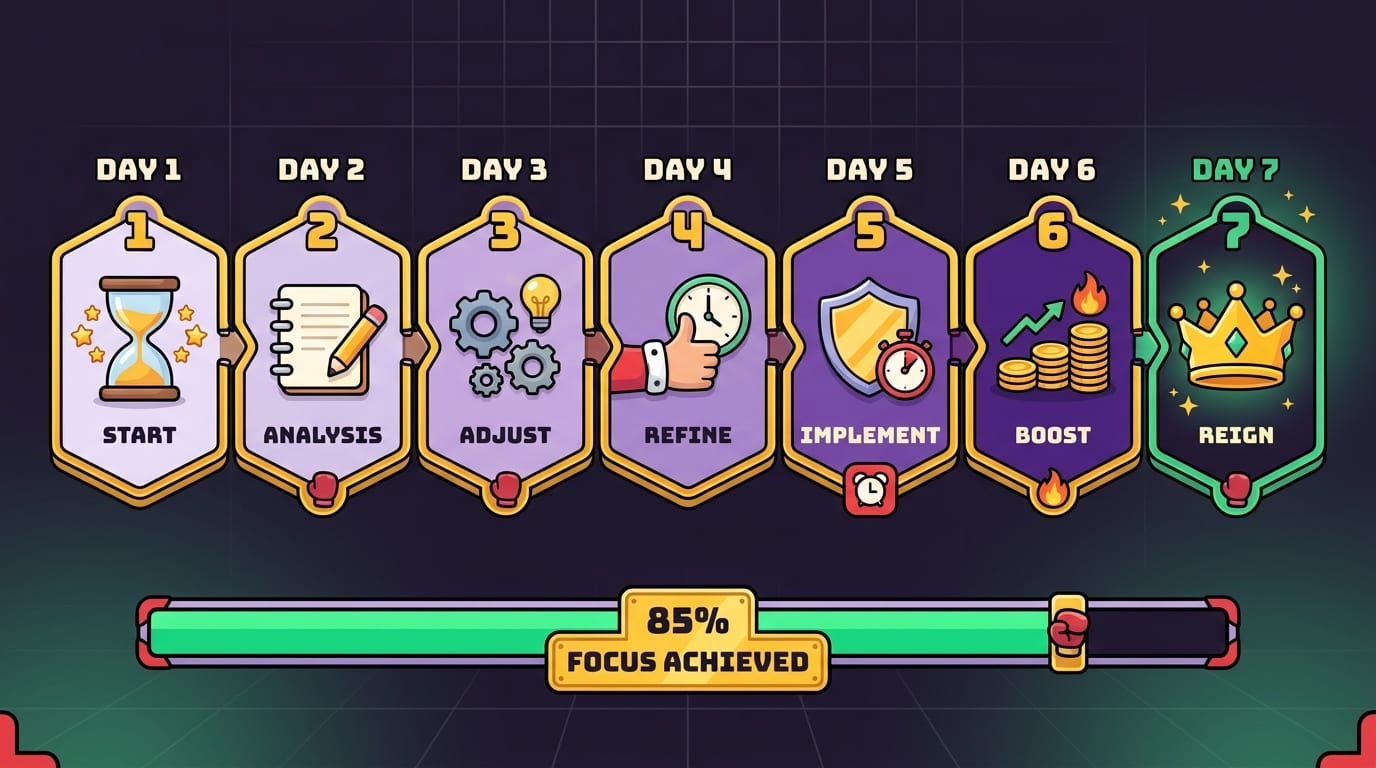
A Practical 7-Day Plan to Increase Productivity With Time Tracking
Want a concrete plan? Good. The kingdom loves concrete plans. Here is a one-week experiment you can run without turning your life into a productivity cult.
Day 1: Set up simple categories
Create five to seven categories: deep work, communication, meetings, admin, learning, breaks, and distractions. If you use project-based work, add project names too. Keep it clean. If setup takes longer than 20 minutes, you are procrastinating in a fancy hat.
Day 2: Track honestly
Record your day as it happens. Do not change behavior yet. If you spend 28 minutes reading news headlines and feeling your soul leave your body, track it. Data first. Judgment never.
Day 3: Notice interruptions
Add quick notes when you get interrupted. Was it a notification? A meeting? A website? A sudden urge to research “best productivity chairs” for 40 minutes? These notes explain the numbers.
Day 4: Protect one focus block
Pick one 60–90 minute block for your most important task. Start your tracker. Turn on BlockChamp. Block your biggest distraction category. Work. If you get The Stare-Down, accept your roast and return to the task with dignity. Or at least with fewer tabs.
Day 5: Compare estimates vs. reality
Before each task, estimate how long it will take. Afterward, compare. This one habit will make you dramatically better at planning. It will also reveal that “quick admin” is a liar wearing business casual.
Day 6: Batch shallow work
Use your tracked data to group email, messages, and admin into batches. Do not let them leak across the whole day like productivity glitter. Glitter is forever. So is inbox chaos.
Day 7: Review and choose one upgrade
Look at your week. Pick one improvement for next week: block a site, move deep work earlier, reduce meetings, change break timing, or create a recurring focus schedule. One upgrade. Simple. Sustainable. Crown approved.
So, Does a Time Tracker Really Increase Productivity?
Yes—when you use it to change behavior, not just collect numbers. The real answer to how using a time tracker can increase your productivity is that it creates awareness, improves planning, exposes distractions, and gives you a feedback loop. You stop guessing. You start managing. You become less vulnerable to invisible time leaks and more intentional about your best hours.
But tracking alone is only half the battle. If your data shows that social media, YouTube, WhatsApp, news, or random browsing keeps wrecking your focus, you need guardrails. That is where BlockChamp fits naturally. Track the leak, then let The King block the leak with gloves, XP, badges, reigns, and the occasional savage stare-down. It is productivity with a crown and a jab.
Start small. Track one week. Review once. Protect one focus block. Block one major distraction. Then build from there. You do not need to become a perfect productivity machine. You just need to become a little harder to distract than yesterday.
And if the algorithm comes knocking? Defend the throne. Crush the scroll. Become king of your time.
Related posts

Finding Focus For Fiction Writing

Learning To Focus In A Digital World As A Creative

Finding Focus For Personal Growth
